Discover three new Vouch POS online ordering features that help restaurants streamline ordering, increase average order value, and encourage repeat business. From making it easier for loyal customers to reorder their favorite meals to promoting best-selling dishes and suggesting add-ons, these tools help restaurants turn a smoother online ordering experience into more sales opportunities.
Running a restaurant means constantly looking for ways to serve customers better while keeping business moving. From managing a busy kitchen to updating your menu and handling online orders, there is always something happening behind the scenes.
And when it comes to restaurant online ordering system, even the smallest improvements can make a difference.
Think about your customers for a moment. Some know exactly what they want and order the same meal every Friday. Others are exploring your menu for the first time and need a little help deciding what to try. Then there are customers who might be happy to add a side, a drink, or an extra topping if you suggest the right option at the right time.
These are everyday situations, but they also present opportunities to make ordering easier and create a better customer experience.
At Vouch POS, we believe restaurant technology should solve real problems, not simply add more buttons to a screen. That’s why we continue to listen to restaurant owners, understand their needs, and introduce features that make online ordering more convenient for customers and more useful for businesses.
We’ve recently added three features to the online ordering of Vouch POS that do exactly that. They help customers reorder their favorites, discover popular menu items, and find relevant add-ons while placing an order.
Let’s take a closer look at how these features work and how you can make the most of them for your restaurant.
1. From Your Last Order: Make Repeat Ordering Easier
Every restaurant has regular customers who know exactly what they want. They have their favorite meals and prefer them prepared a certain way.
Let’s take a pizzeria as an example.
Imagine a customer who regularly orders your Build Your Own Pizza – 12″ with home-style thick crust, BBQ sauce, double extra cheese, black olives, garlic, and pepperoni.
That’s quite a specific combination!
The next time they order, they must select the pizza size, choose the crust and sauce, and add all their preferred toppings again.
It’s not difficult, but repeating these steps every time can become tedious. They might even forget a topping or select the wrong option.
That’s where the new From Your Last Order feature comes in.
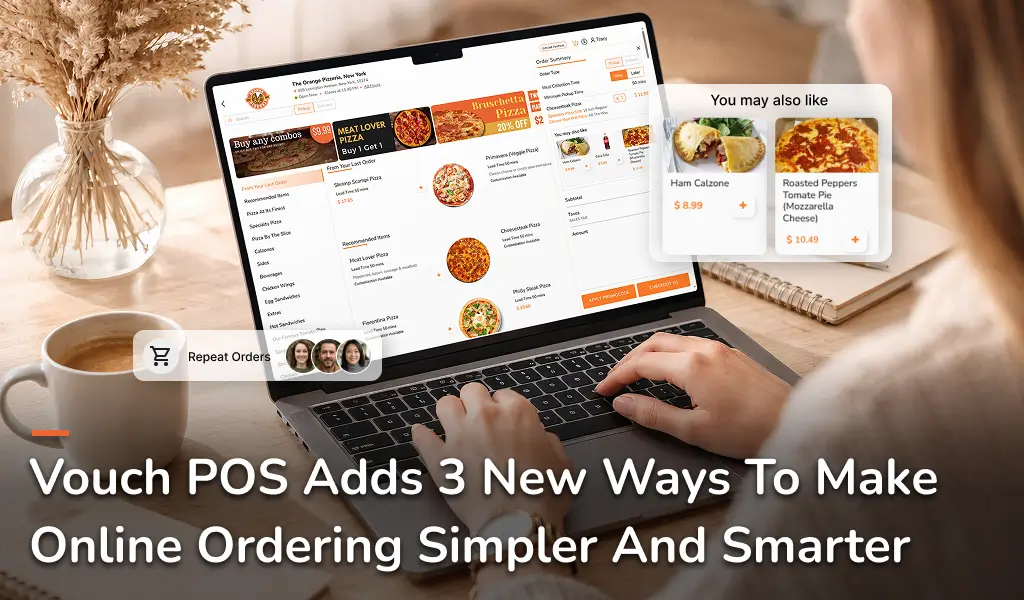
Vouch POS’s online ordering page tracks each customer’s previous orders and displays their previously ordered items in the From Your Last Order section.
The best part? It’s personalized for every customer, showing their own order history.
This makes repeat ordering quick and convenient. Instead of browsing the entire menu and selecting all their favorite items again, customers can simply find a previous order and reorder it with just a few clicks.
An added layer
When they open a previously ordered item, they can use a toggle to decide whether to reuse their previous customizations. The toggle also shows the date the item was last ordered.
Here’s how it works:
Toggle ON – Reuse Previous Customizations: The item automatically includes the add-ons, modifications, and customizations from the previous order. Our pizza-loving customer can reorder their usual combination without selecting every option again.
Toggle OFF – Customize From Scratch: Customers can choose their preferences again. They might switch black olives for mushrooms, select a different sauce, or try a completely new combination.
This gives customers the best of both worlds: the convenience of reordering a favorite and the freedom to try something different.
You can also customize the section name to suit your restaurant’s branding.
How does this benefit your restaurant?
Here's how this feature makes a difference:
- Makes repeat orders quicker and easier: Customers can find items they've ordered before without browsing the entire menu again. It's especially helpful for regular customers who tend to stick to their favorite meals.
- Remember their customizations: If a customer loves a pizza with a particular crust, sauce, toppings, and extra cheese, they don't have to remember and select every detail again. They can reuse their previous selections instead.
- Gives customers the freedom to change things: Craving the same pizza but want to try a different sauce or swap black olives for mushrooms? Customers can turn off their previous customizations and make changes from scratch, giving them convenience without limiting their choices.
- Creates a smoother ordering experience: By reducing repetitive steps, the feature helps customers get through the ordering process with less effort. That can be particularly useful when they're ordering in a hurry or placing another order for their usual meal.
The idea is simple: When customers have already found their perfect pizza, they shouldn't have to build it from scratch every time. They can bring back the order they love, make any changes they want, and get on with their day.
2. Recommended Items: Put Your Best Sellers in the Spotlight
Have you ever had a customer ask, “What do people usually order here?”
It’s a common question, especially from first-time customers.
As a restaurant owner or manager, you probably know which dishes are popular and which items customers keep coming back for. But new customers may not know your best sellers or signature dishes.
They see your menu and have to figure out what to try.
This becomes even more challenging when you offer a wide variety of pizzas, sides, desserts, and drinks.
The new Recommended Items feature helps you highlight the items you want customers to notice.
Turn Your Best Sellers into Recommendations
You don’t have to guess which items to recommend. Start by grabbing a report of your most-ordered items and identify the dishes your customers already love.
For example, your report might show that BBQ Chicken Pizza, Classic Pepperoni Pizza, and Garlic Bread are among your most frequently ordered items.
You can mark these items as recommended in your Vouch POS restaurant panel. They’ll then appear in a dedicated section on your online ordering page.
You can also customize the section name to suit your restaurant. Here are a few ideas:
- Best Sellers – Highlight the items customers order most often.
- Customer Favorites – Showcase dishes that keep customers coming back.
- Our Top Recommendations – Draw attention to items you’d like customers to try.
- Must-Try Pizzas – Feature your signature pizzas.
- Popular Picks – Give customers a quick way to discover crowd favorites.
Choose a name that fits your brand and makes sense for your customers.
How to mark items as recommended?
Follow these two simple steps:
- Mark the item as recommended: Open the menu item in your Vouch POS restaurant panel and enable the Recommended Item option.
- Display the recommended section: Go to Website Settings in the restaurant panel and enable Display Recommended Items.
Once both options are enabled, your selected items will appear in the Recommended section of your online ordering page.
Why does this matter for your restaurant?
Imagine a first-time customer browsing your pizza menu. They might know what a pepperoni pizza is, but they may not know that your BBQ Chicken Pizza is a customer favorite.
A recommended section helps them discover popular choices without having to explore every item.
Here's how you can benefit:
- Help customers decide: Give first-time customers a useful starting point when they're unsure what to order.
- Increase visibility for popular dishes: Bring your best sellers to the forefront instead of leaving them buried in a long menu.
- Make use of sales reports: Use your most-ordered items report to decide what deserves more attention.
- Keep recommendations fresh: Review your reports regularly and update the section as customer preferences change.
Your recommended section doesn't have to feature only your best sellers. You can also highlight signature dishes, seasonal favorites, or items you'd like more customers to discover.
The idea is simple: help customers find something they'll love while giving your standout menu items more visibility.
3. Upselling: Suggest Items That Complement the Meal
Increasing the value of each order doesn’t always mean raising prices or introducing new menu items.
Sometimes, it’s about helping customers discover something that goes well with what they’re already ordering.
For example, a customer ordering a Mac n’ Cheese pizza might also enjoy garlic bread, Hot Honey Dip, chicken wings, a Pepsi, or dessert. They may be happy to add one of these to their order but might not think to look for it on their own.
A timely, relevant suggestion can help them discover these extras while giving your restaurant an opportunity to increase the order value.
That’s what the new Upselling feature in Vouch POS helps you do.
Make Every Menu Category an Upselling Opportunity
You can mark a menu item as an upsell item and decide which menu category it should appear under.
Let’s say your restaurant offers Pizza Specials, Build Your Own Pizza, Sides, Desserts, and Drinks.
You might want to promote garlic bread and chicken wings alongside your pizza specials. You could also suggest a dessert for customers browsing the same category.
Here are a few examples.
Example 1: Pizza Specials + Garlic Bread
A customer is browsing your Pizza Specials category and deciding between a BBQ Chicken Pizza and a Veggie Supreme Pizza.
You could assign Garlic Bread as an upsell item for this category, giving customers an easy way to add a familiar side to their order.
Example 2: Pizza Specials + Chicken Wings
Chicken wings can be a great addition to a pizza meal, especially for customers ordering for a group or family.
You could assign Chicken Wings as an upsell item for the Pizza Specials category, helping customers discover another option that’s great for sharing.
Example 3: Pizza Specials + Mozzarella Sticks
A customer ordering a BBQ Chicken Pizza or Pepperoni Pizza might enjoy a side of crispy mozzarella sticks.
You could assign Mozzarella Sticks as an upsell item for the Pizza Specials category, giving customers an easy way to add a cheesy appetizer to their meal.
Example 4: Pizza Specials + Jalapeño Poppers
If your customers enjoy a little heat, jalapeño poppers can be a great addition to their pizza order.
You could assign Jalapeño Poppers as an upsell item for the Pizza Specials category, making it easier for customers to discover and add this spicy side to their meal.
How to add upsell items?
Setting up upsell items in Vouch POS is straightforward:
- Go to the Menu section in your Vouch POS restaurant panel, choose the item you want to configure, and click Upsell.
- On the next screen, click Add Upsell.
- Select the menu item you want to display as an upsell option.
- Under Show for All Categories, select Yes to show the upsell item across all menu categories, or No to limit it to specific categories.
- If you choose No, select the specific menu category where you want the upsell item to appear.
That’s it! Your upsell item will appear according to the category settings you’ve selected.
Why Does This Feature Matters for Your Restaurant?
Upselling works best when the suggestions are relevant to what customers are ordering.
Someone browsing pizza specials might appreciate a suggestion for garlic bread or chicken wings. However, showing the same suggestions across unrelated menu categories may not make as much sense.
With Vouch POS, you can control where your upsell items appear.
An upsell item can be displayed across all categories or limited to the specific categories you choose.
This gives you more control over how you promote additional items and helps keep suggestions relevant.
Here’s how it can benefit your restaurant:
- Create opportunities to increase order value: Give customers more options to add sides and other items to their meals.
- Promote more of your menu: Bring attention to items customers might otherwise overlook.
- Make better use of existing items: Promote dishes you already serve instead of relying on new menu additions.
- Keep suggestions relevant: Match upsell items to the categories customers are browsing.
A good starting point is to review your order history and identify items customers frequently order together. If garlic bread often accompanies your pizzas, for example, it could be a sensible choice to promote alongside your pizza specials.
The goal isn’t to push customers to buy more than they want. It’s to help them discover options they might genuinely enjoy.
Better Online Ordering Starts With Listening
At Vouch POS, we understand that restaurant owners need technology that does more than process orders. It should make everyday tasks easier, improve the customer experience, and support business growth.
That’s why we continue to listen to restaurant owners and introduce features that address real needs.
Here’s a quick recap of what’s new:
- From Your Last Order: Make repeat ordering easier by letting customers reuse their previous customizations or start fresh.
- Recommended Items: Highlight popular dishes and use your most-ordered items report to help customers discover your best sellers.
- Upselling: Promote relevant menu items across all categories or within selected categories to create more opportunities to increase order value.
Each feature improves a different part of the online ordering journey, but they all share the same goal: making ordering more convenient for customers while giving restaurant owners more control over their menus.
Because better restaurant technology isn’t just about adding more features. It’s about adding the right ones.
We listen to restaurant owners, pay attention to how their businesses operate, and continue to improve Vouch POS based on real-world needs.
Have an idea that could make Vouch POS even better for your restaurant? We'd love to hear from you. Your feedback helps us continue building tools that support your business and make ordering easier for your customers.
Get in touch with Vouch POS at info@vouchpos.com or schedule a quick call to learn more about these features and how you can use them in your restaurant.
Connect directly with a Vouch POS tech expert. No sales pressure, just a casual conversation to see if we're a fit for your restaurant.